Network Discovery - Scan-ta Clause 🎅
This is a walkthrough for the TryHackMe room Network Discovery - Scan-ta Clause 🎅. This room focuses on:

- learning the basics of network service discovery with Nmap
- learning core network protocols and concepts along the way
- applying your knowledge to find a way back into the server
The Story 🎅

Christmas preparations are delayed - HopSec has breached our QA environment and locked us out! Without it, the TBFC projects can't be tested, and our entire SOC-mas pipeline is frozen. To make things worse, the server is slowly transforming into a twisted EAST-mas node. Can you uncover HopSec's trail, find a way back into tbfc-devqa01, and restore the server before the bunny's takeover is complete? For this task, you'll need to check every place to hide, every opened port that bunnies left unprotected. Good luck!

Information Gathering
Start the machine and save IP address for the room.
export IP=10.66.186.0
What evil message do you see on top of the website?
Let's scan the target using nmap to discover open ports and services.
└─$ nmap $IP
Nmap scan report for 10.66.186.0
Not shown: 998 filtered tcp ports (no-response)
PORT   STATE SERVICE
22/tcp open  ssh
80/tcp open  http
The command scanned the top 1000 ports and found two open ports: 22 (SSH) and 80 (HTTP). Let's browse to the web server on port 80.
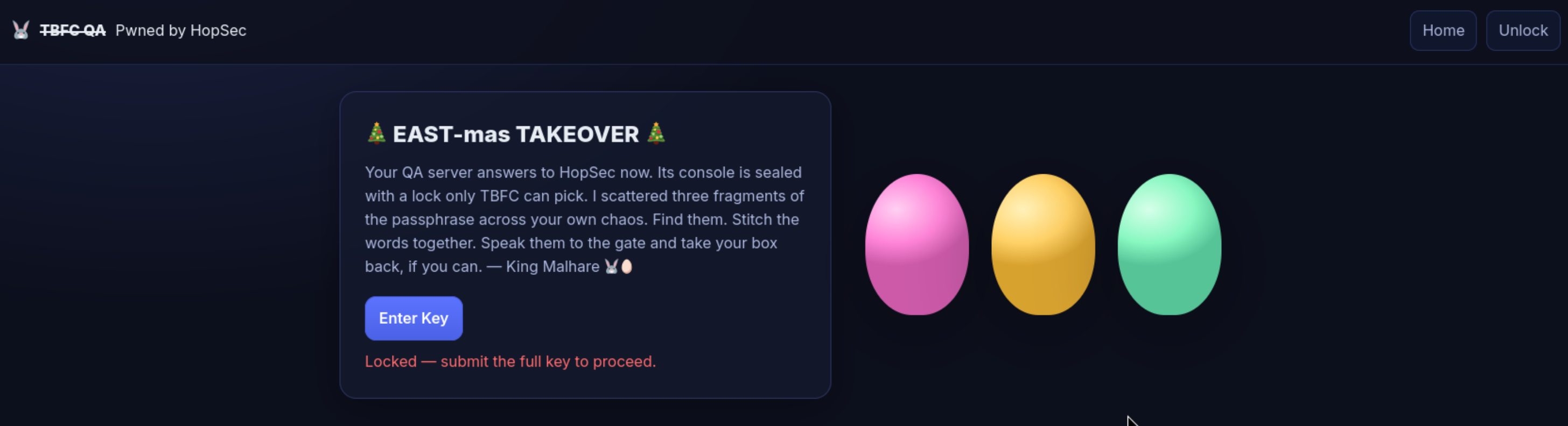
Answer: pwned by hopsec
What is the first key part found on the FTP server?
This suggested that there might be more services running on the target. Let's perform a more thorough scan using nmap and scan all 65535 ports.
└─$ nmap -p- --script=banner $IP
Nmap scan report for 10.66.186.0
Not shown: 65531 filtered tcp ports (no-response)
PORT      STATE SERVICE
22/tcp    open  ssh
|_banner: SSH-2.0-OpenSSH_9.6p1 Ubuntu-3ubuntu13.14
80/tcp    open  http
21212/tcp open  trinket-agent
|_banner: 220 (vsFTPd 3.0.5)
25251/tcp open  unknown
|_banner: TBFC maintd v0.2\x0AType HELP for commands.
Looks like we found a running FTP service. FTP runs on port 21 by default but it's possible change the port, in this case 21212. Let's try to access the FTP server.
root@ip-10-66-111-79:~# ftp 10.66.186.0 21212
Name (10.66.186.0:root): anonymous
ftp> ls
-rw-r--r--    1 ftp      ftp            13 Oct 22 16:27 tbfc_qa_key1
ftp> get tbfc_qa_key1
[GET HIDDEN KEY 1 FROM HERE]
ftp> ! # Exit
Answer: KEY1:3aster_
What is the second key part found in the TBFC app?
Now, let's move to a service running on port 25251. It looks like a custom service called TBFC maintd v0.2. Let's connect to it using netcat.
nc -v $IP 25251
Connection to 10.66.186.0 25251 port [tcp/*] succeeded!
TBFC maintd v0.2
Type HELP for commands.
HELP
Commands: HELP, STATUS, GET KEY, QUIT
GET KEY
KEY2:15_th3_
Answer: KEY2:15_th3_
What is the third key part found in the DNS records?
We have scanned TCP ports, but what about UDP ports? Let's scan the top 100 UDP ports using nmap.
└─$ nmap -sU --top-ports 100 $IP
Not shown: 99 open|filtered ports
PORT   STATE SERVICE
53/udp open  domain
We found a DNS service running on port 53. Let's use dig to query the DNS server for any interesting records.
dig @$IP TXT key3.tbfc.local +short
KEY3:n3w_xm45
Answer: KEY3:n3w_xm45
### Which port was the MySQL database running on?
We have found all three key parts. Let's combine them to get the gain access the secret admin console on the web server.
We have access to the admin console now. Let's just check what what ports are running using ss -tunlp.
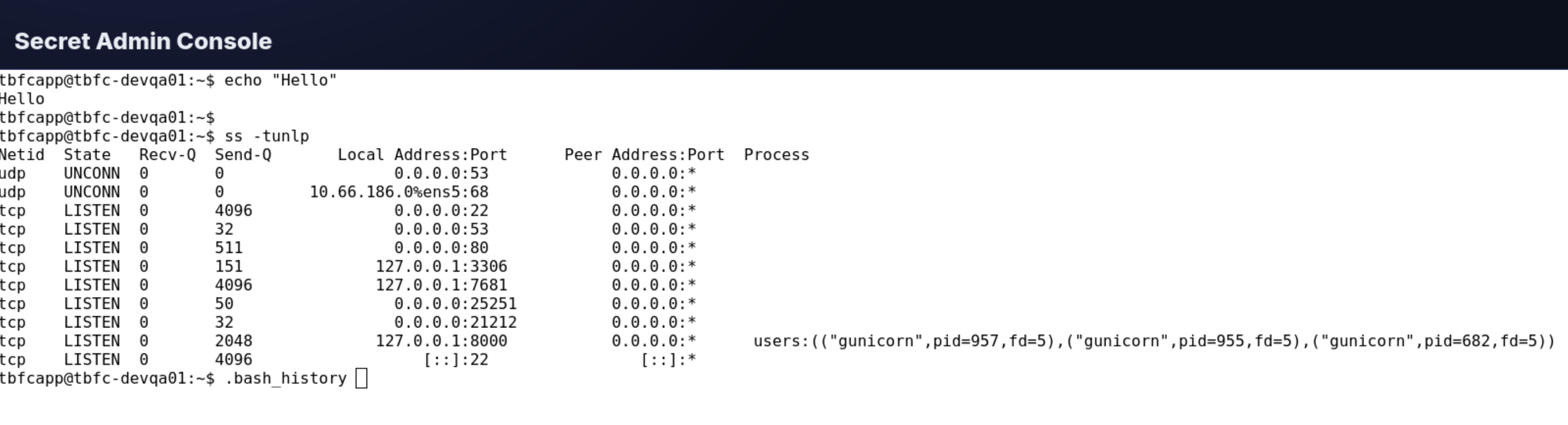
Answer: 3306
Finally, what's the flag you found in the database?
Now that we know MySQL is running on port 3306, let's try to connect to it using the credentials we have.
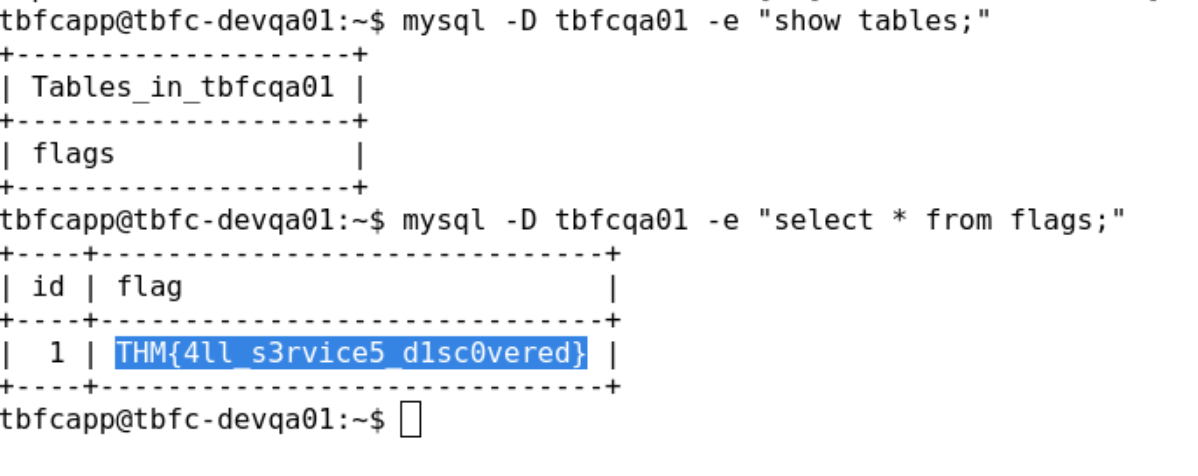
Answer: THM{4ll_s3rvice5_d1sc0vered}
Completion
We have completed the room and helped TBFC regain access to their QA environment by discovering all running services and finding a way back into the server. Great job!