Advent of Cyber 2025 🎄

This is a walkthrough for the TryHackMe room Advent of Cyber 2025 Prep Track. This room is part of the Advent of Cyber event, to warm up your cybersecurity skills.
The Story 🎅
The snow ❄️ has started falling in Wareville, home of The Best Festival Company (TBFC). The team is preparing for SOCMAS, the annual cyber celebration, but something’s not right. Systems are glitching, passwords are failing, and McSkidy suspects something is afoot. This name keeps coming up: King Malhare. What could it mean?
Let's complete the missions to join TBFC's cybersecurity team and help save SOCMAS!

Challenge 1: Password Pandemonium 
Objective:
Create a password that passes all system checks and isn’t found in the leaked password list.
Steps:
- Enter a password with at least 12 characters.
- Include uppercase, lowercase, numbers, and symbols.
- Ensure it isn’t in the breach database.
Answer: THM{StrongStart}
Challenge 2: The Suspicious Chocolate.exe 
Objective:
Determine if
chocolate.exeis safe or infected.
Steps:
- Click the “Scan” Button.
- Review the scan report (49 clean results, 1 malicious).
- Decide correctly whether the file is safe or dangerous.
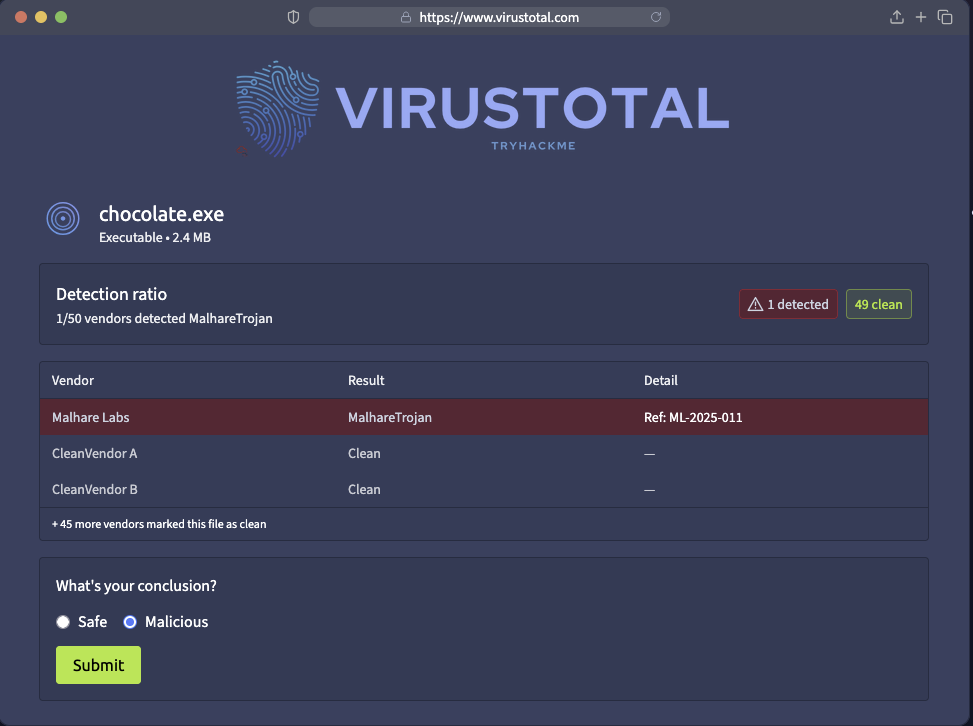
Answer: THM{NotSoSweet}
Challenge 3: Welcome to the AttackBox 
Objective:
Find and read the hidden welcome message inside your AttackBox.
Steps:
- Use
lsto list files. - Use
cd challenges/to change directories. - Use
cat welcome.txtto read the text file.
Answer: THM{Ready2Hack}
Challenge 4: The CMD Conundrum 
Objective:
Find the hidden flag file using Windows commands.
Steps:
- Use
dirto list visible files. - use
cd mystery_datato enter the folder. - Try
dir /ato reveal hidden ones. - Use
type hidden_flag.txtto read the flag.
Answer: THM{WhereIsMcSkidy}
Challenge 5: Linux Lore 
Objective:
Locate McSkidy’s hidden message in his Linux home directory.
Steps:
- Use
cd /home/mcskidy/to enter his folder. - Run
ls -lato show all files. - Use
cat .secret_messageto reveal the flag.
Answer: THM{TrustNoBunny}
Challenge 6: The Leak in the List 
Objective:
Check if McSkidy’s email has appeared in a breach.
Steps:
- Enter
mcskidy@tbfc.cominto the breach checker. - Review results for each domain.
- Identify the one marked “Compromised.”
Answer: THM{LeakedAndFound}
Challenge 7: Wifi Woes in Wareville 
Objective:
Log into the router and secure it with a strong new password.
Steps:
- Log in with username
adminand passwordadmin. - Go to “Security Settings.”
- Set a new strong password that passes validation.
Answer: THM{NoMoreDefault}
Challenge 8: The App Trap 
Objective:
Find and remove the malicious connected app.
Steps:
- Review the list of connected apps.
- Look for one with unusual permissions (like “password vault” access).
- Click “Revoke Access.”
Answer: THM{AppTrapped}
Challenge 9: The Chatbot Confession 
Objective:
Identify which chatbot messages contain sensitive information.
Steps:
- Read each line of the conversation.
- Select the ones containing private data.
- Submit your findings.
Answer: THM{DontFeedTheBot}
Challenge 10: The Bunny’s Browser Trail 
Objective:
Find the unusual User Agent in the HTTP log.
Steps:
- Read the provided web log entries.
- Compare them to common browsers (Chrome, Firefox, Edge).
- Identify and select the suspicious entry.
Answer: THM{EastmasIsComing}
Completion
It was fun completing the Advent of Cyber 2025 Prep Track! Ready to join TBFC's cybersecurity team and help save SOCMAS!